Overblog Tous les blogs Top blogs Technologie & Science Tous les blogs Technologie & Science
Editer l'article Suivre ce blog Administration + Créer mon blog
MENU

Articles Oracle Forms, PL/SQL, Java, J2EE

Publicité

Forms and multi-line tooltips

Here is a very simple PJC code that allow to have multi-line tooltips within Forms:
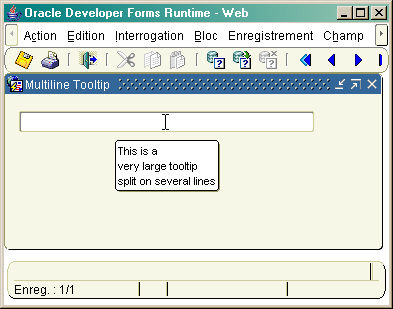
Multi-line Tooltips

Here is the Java code:

package oracle.forms.fd;

import java.util.StringTokenizer;
import oracle.forms.handler.IHandler;
import oracle.forms.properties.ID;
import oracle.forms.ui.VTextField;

  public class JTextFieldTooltip extends VTextField
  {
    private   IHandler  m_handler; 
    private String sTooltip = "" ;
    private String sSep = "|" ;
   
    public JTextFieldTooltip ()
    {
       super();
    }

   
    public boolean setProperty(ID property, Object value)
    {
       if(property.toString().equals("POPUPHELP_ID"))
       {
         String s = value.toString() ;
         oracle.forms.ui.FormsToolTip tp = (oracle.forms.ui.FormsToolTip)value ;
         String stool = tp.getToolTipProperty(ID.INDEX_POPUPHELP_STRING).toString() ;
         if(stool != null && ! stool.equals(""))
         {
           String sTooltip = "" ;
           StringTokenizer st = new StringTokenizer(stool,sSep);
           if(! st.hasMoreTokens())  sTooltip = stool;
           else
           {
             while(st.hasMoreTokens())
             {
               sTooltip += st.nextToken() + "n" ;
             }
           }
           tp.setToolTipProperty(ID.INDEX_POPUPHELP_STRING,(Object)(sTooltip));
         }
         else return true ;
       }
       return super.setProperty(property, value);
    }

  }

You can get the .jar file here

All you have to do is to set the text items implementation class to : oracle.forms.fd.JTextFieldTooltip
then insert | (alt-124) character in the tooltip text Forms property of the item to enforce the carriage return.

The same concept can be applied to other item types.

Publicité
Retour à l'accueil
Partager cet article
Repost0
Pour être informé des derniers articles, inscrivez vous :
Commenter cet article
C
<br /> Hi. I have done the setup as mentioned by you.But still its running in single line only.Even though i ahve tip text using |.What could be the reason ?<br />
Répondre
F
<br /> <br /> Did you set the separator character as shonw in the code snippet?<br /> <br /> <br />  <br /> <br /> <br /> <br />
B
Francois - Kevin's suggestion worked for me. I should have thought of this earlier.Forms 10gR2 (10.1.2.0.2).It appears Oracle just never gave us that multiline editor for some reason. In the Initial Value property for the item - I opened the editor.I entered 3 lines:Line1Line2Line3 and saved that. It showed up in the Initial Value property at "Line1 [box] Line2 [box] Line3 [box]"Where [box] is the BOX.I cut and pasted this line into the TOOLTIP property.It displays on the screen as:Line1Line2Line3
Répondre
F
Thanks Brian.This does not work under 9.0.2. Anyway, this bean is a good solution if you generate your forms from Designer ;o)Francois